MS Word Page Layout Tab: Page Setup, Page Background & Paragraph Formatting
Complete exam notes detailing Page Setup (Margins, Gutter Margin, Orientation, Size, Columns), Page Background (Watermark, Colors, Borders), and Paragraph Indents & Spacing.
Siddharth Sharma
M.Sc. CS • FacultyExpert exam walkthrough for DCA-102 and PGDCA-102 Office Automation Unit 1 syllabus.
The Page Layout Tab provides controls for page dimensions (Margins, Gutter Margin for binding, Orientation: Portrait/Landscape, Paper Size: A4/Legal), background styling (Watermark, Borders), and numerical paragraph Indents (Left/Right) & Spacing (Before/After in pt).
Introduction to the Page Layout Tab
Ribbon Layout & Structural Geometry
Definition: The Page Layout Tab (referred to as the Layout Tab and Design Tab in newer versions of Microsoft Word) provides structural controls for document geometry, print borders, page background elements, and precise paragraph indents and spacing.
It defines how textual and graphical content fits on the physical sheet before physical printing, ensuring alignment with standard printer trays and document binding requirements.
Margins, Orientation, Size
Watermark, Color, Borders
Indent: Left/Right, Spacing
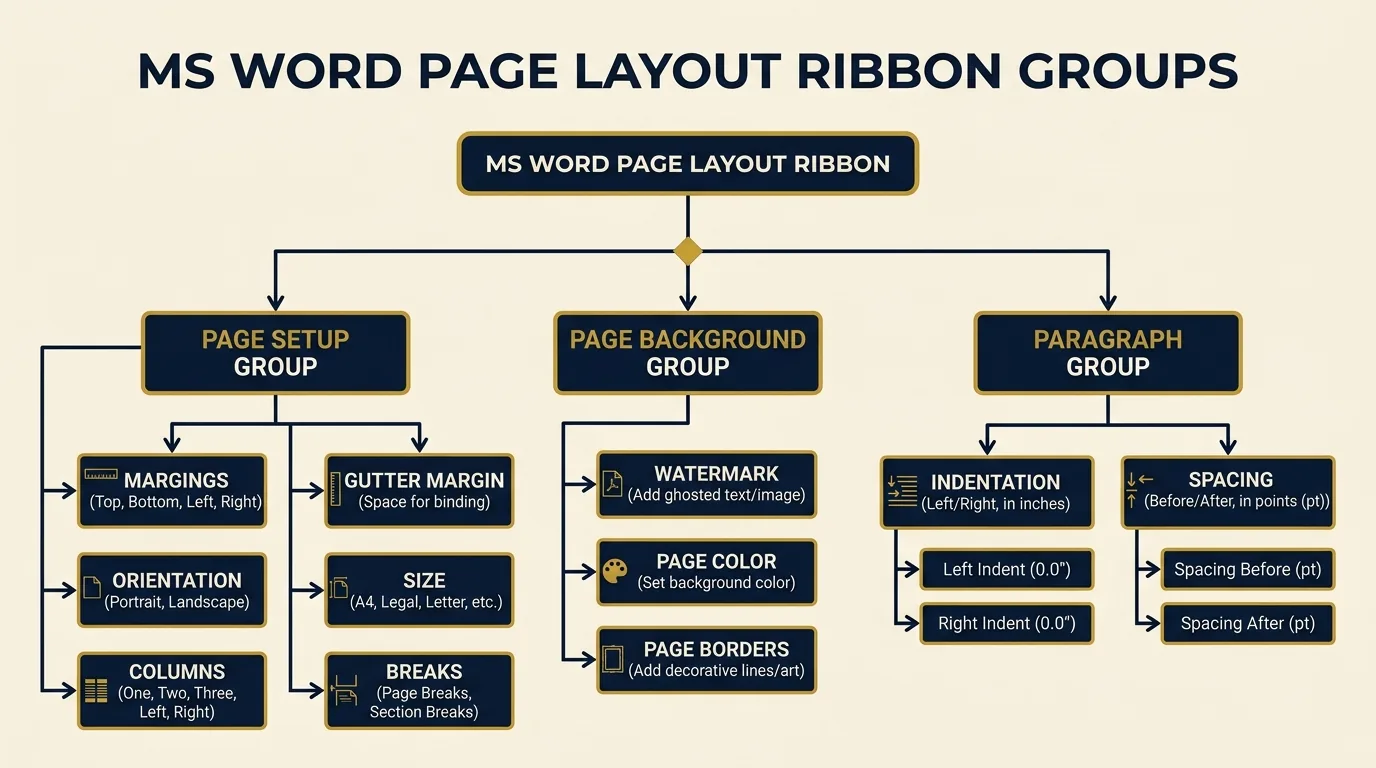
Page Setup Group (Margins, Orientation, Size, Columns, Breaks)
Layout Tab → Page Setup Group
The Page Setup Group manages the physical dimensions, margins, and section flow of the document workspace. Clicking the Dialog Box Launcher opens the full Page Setup Dialog Box.
Margins & Gutter Margin
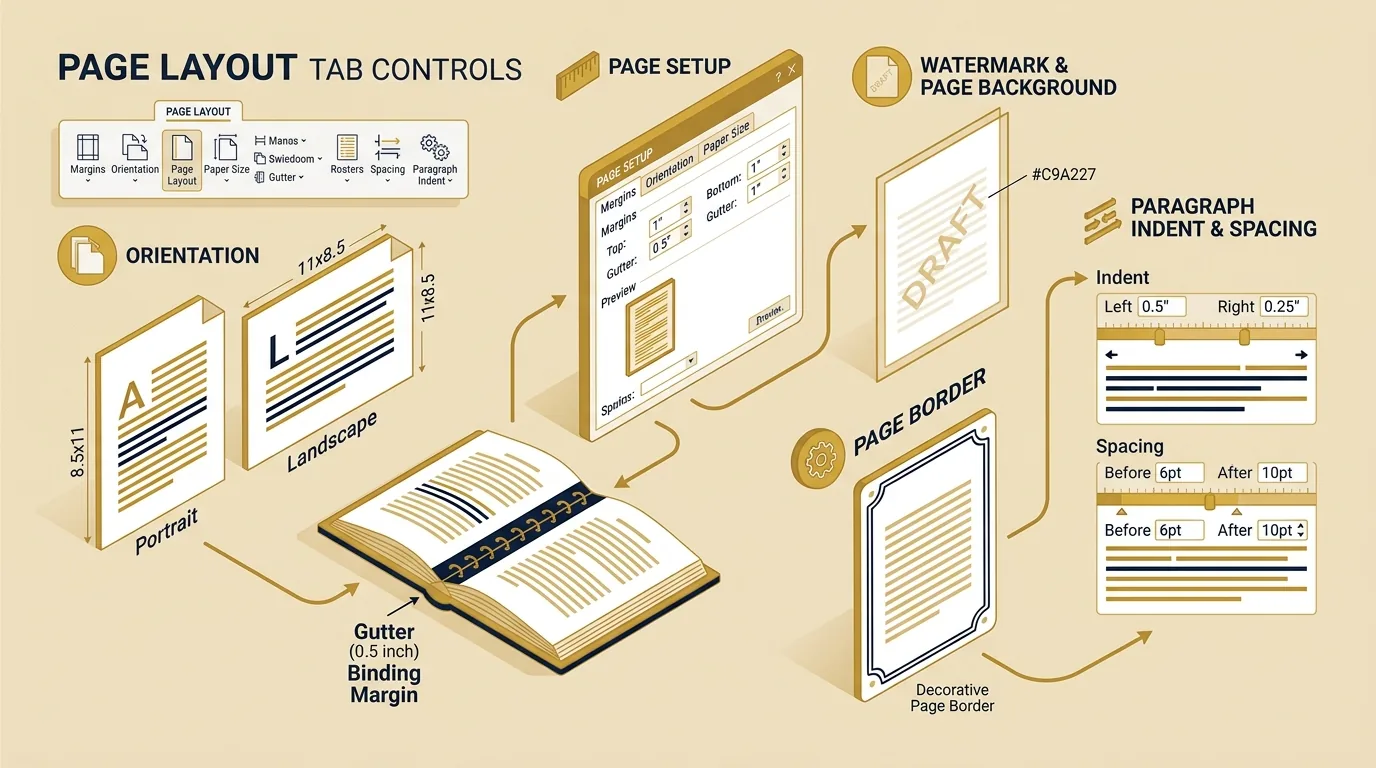
Margins: Blank boundary space around four edges (Top, Bottom, Left, Right — Normal 1", Narrow 0.5").
Gutter Margin: Extra space added specifically to the binding side (Left or Top) to prevent text from being hidden in physical book binding.
Orientation
Portrait: Vertical page direction (8.27 x 11.69 inches for A4), ideal for standard letters.
Landscape: Horizontal page direction (11.69 x 8.27 inches for A4), ideal for wide tables and brochures.
Paper Size & Columns
Paper Size: Selects paper tray sizes (A4, Letter 8.5x11", Legal 8.5x14").
Columns: Formats continuous text into multi-column vertical layouts (One, Two, Three, Left, Right) like newspapers.
Breaks & Line Numbers
Breaks: Inserts Page Breaks or Section Breaks (Next Page, Continuous) to isolate layouts.
Line Numbers / Hyphenation: Automatically numbers document lines or breaks long words at line ends.
Page Background Group (Watermark, Page Color, Page Borders)
Design Tab / Page Layout Tab → Page Background Group
The Page Background Group manages overall document aesthetics, branding, and security:
Watermark
Inserts faint, semi-transparent ghosted text (CONFIDENTIAL, DRAFT) or image logos behind document text with Washout protection.
Page Color
Applies solid background colors, gradient fills, textures, or pattern fills to the entire page sheet.
Page Borders
Opens Borders and Shading Dialog Box to apply solid lines, shadow borders, 3D borders, or decorative Art Borders around page perimeters.
Paragraph Group (Indent and Spacing)
Layout Tab → Paragraph Group
The Paragraph Group on the Layout Tab provides precise numerical controls for text alignment boundaries and vertical line intervals:
Paragraph Indent & Spacing Controls
- Left Indent: Moves paragraph inward away from left margin (e.g., 0.5").
- Right Indent: Moves right boundary inward away from right margin (e.g., 0.5").
- Spacing Before: Inserts vertical blank space ABOVE selected paragraph (e.g., 6 pt, 12 pt).
- Spacing After: Inserts vertical blank space BELOW selected paragraph (e.g., 8 pt, 10 pt).
Page Setup & Paragraph Ribbon Controls Visual Diagram
Summary Comparison Table / तुलनात्मक सारांश तालिका
Quick Reference Table
| Tool / Parameter | Functional Group | Unit of Measurement | Primary Purpose |
|---|---|---|---|
| Margins | Page Setup | Inches / cm | Sets blank perimeter borders around text |
| Gutter Margin | Page Setup | Inches / cm | Adds extra binding space to margin edge |
| Orientation | Page Setup | N/A (Portrait/Landscape) | Sets vertical or horizontal page layout |
| Watermark | Page Background | N/A (Text / Image) | Inserts background security or branding |
| Page Border | Page Background | Points (pt) / Art | Applies border outlines around page |
| Indent (L/R) | Paragraph | Inches / cm | Sets horizontal text distance from margins |
| Spacing (B/A) | Paragraph | Points (pt) | Sets vertical distance between paragraphs |
Key Takeaways for Exam Revision
- Page Setup contains Margins, Orientation (Portrait/Landscape), Size, Columns, and Breaks.
- Gutter Margin provides additional margin space specifically for physical book/document binding.
- Page Background contains Watermark, Page Color, and Page Borders.
- Indent controls horizontal distance from margins (Left/Right).
- Spacing controls vertical gaps between paragraphs (Before/After), measured in points (pt).
Summary Bullet Points
- (1) Page Layout controls printable geometry and page boundaries.
- (2) Gutter margin is extra space for book binding.
- (3) Watermark puts ghosted text or image logos behind text.
- (4) Indent is measured in inches/cm; Paragraph Spacing is measured in points (pt).
6. MCQ & Viva Practice Questions
Frequently Asked Questions (FAQs)
What is Gutter Margin and why is it used?
What is the difference between Paragraph Indent and Paragraph Spacing?
Where are Watermark, Page Color, and Page Borders located in modern MS Word?
Fast Index TOC
- 1. Introduction to Page Layout Tab
- • Page Setup (Margins, Gutter)
- • Orientation (Portrait/Landscape)
- • Page Background (Watermark)
- • Paragraph Indent & Spacing (pt)
- Summary Comparison Table
- MCQ & Viva Practice Questions
Related Topics
MS Word Interface & Ribbon Layout
Title Bar, Ribbon Tabs, and Status Bar controls.
Section Breaks vs. Page Breaks
Next page section breaks, continuous breaks, and layout isolation.
Home Tab: Font & Paragraph Settings
Text alignment, line spacing, and paragraph borders.
Document Management & Print Preview
Print preview, printer settings, and document saving.