
Data Processing: Data, Systems, Storage & Processing Techniques
Understanding the difference between raw data and meaningful information is the foundation of computer science. This guide explores the Data Processing System, detailing the cycle of converting input into output, various processing methods, and how data is permanently stored.
What you will learn: We will cover the difference between Data and Information, the Data Processing Cycle, Processing Methods (Batch, Real-Time, Online), and Data Storage concepts like the Data Hierarchy.
1Understanding Data vs. Information
Definition (Data): Data refers to raw, unorganized, unanalyzed facts, figures, symbols, or observations collected from various sources that lack meaningful context on their own.
Data serves as the raw input for any computing operation. Once data is processed, structured, and contextualized, it becomes Information.
- Raw Data Example: 101, Siddharth, 95, 88, 92 (Unclear meaning).
- Processed Information Example: Student Roll No 101 (Siddharth) scored an average of 91.6% in DCA Examination (Clear, actionable insight).
+---------------+         +-----------------------+         +-------------------+
|   RAW DATA    |  -----> |    DATA PROCESSING    |  -----> |    INFORMATION    |
| (Input Facts) |         | (Sorting/Calculation) |         | (Meaningful Result)|
+---------------+         +-----------------------+         +-------------------+
2Data Processing System
Definition: A Data Processing System is an integrated combination of hardware, software, personnel, and procedures that transforms raw data into meaningful information.
Stages of Data Processing Cycle:
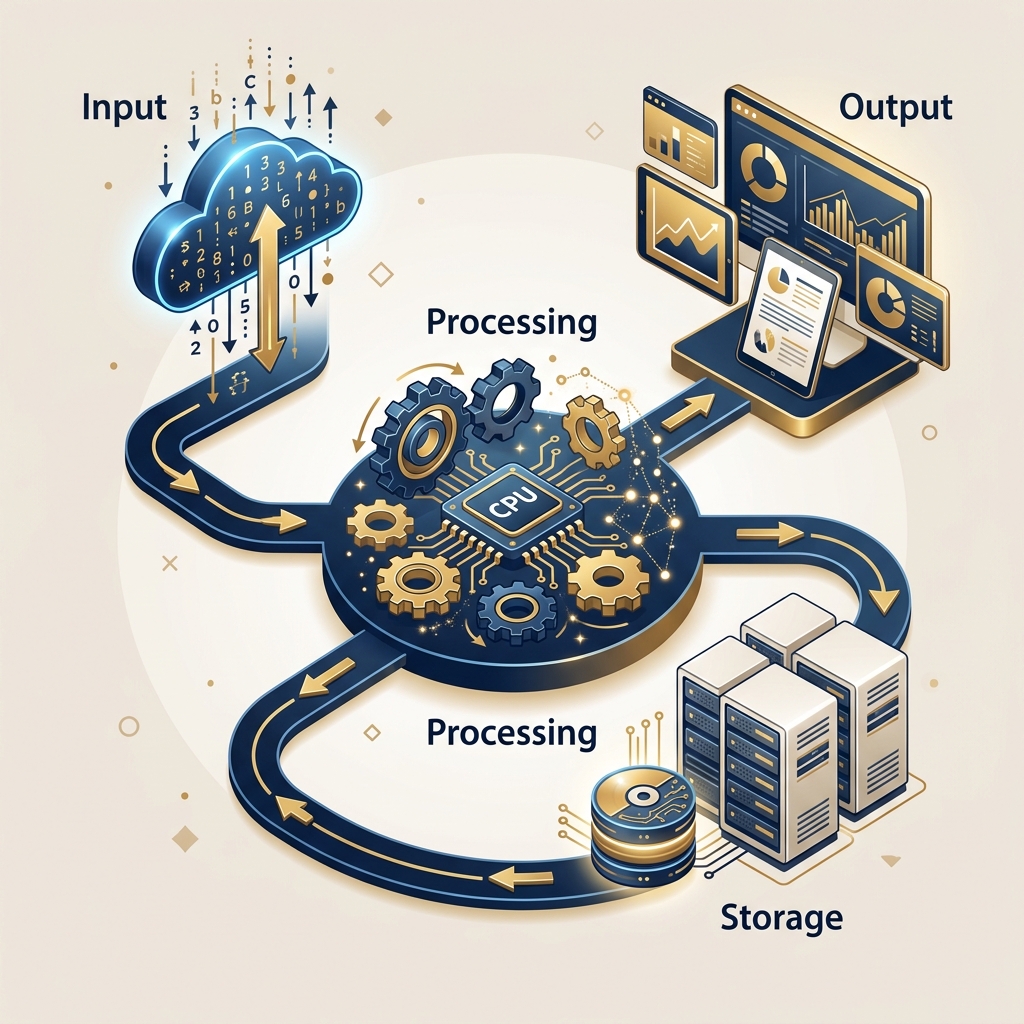
Visualization of the Data Processing Cycle and Storage Concepts
3Methods of Processing Data
Computers process data using different execution modes based on time constraints and system resources:
A. Batch Processing
Concept: Data is accumulated in groups (batches) over a period of time and processed all at once without user intervention.
Use Case: Payroll processing, utility bill generation, credit card statements.
B. Real-Time Processing
Concept: Data is processed instantaneously upon input, producing immediate output to control live environments.
Use Case: Airline reservation systems, ATM cash withdrawals, missile defense guidance systems.
C. Online Processing
Concept: Data is directly fed into the central server and processed immediately as transactions occur.
Use Case: E-commerce transactions, web portal form submissions.
D. Time-Sharing Processing
Concept: Multiple users share the CPU's processing time through rapid time-slicing (quantum allocation).
Use Case: Server environments supporting concurrent user access.
4Data Storage Concepts
Data storage is a critical phase of the processing cycle, categorized by accessibility and permanence:
- Primary Storage (Volatile): Semiconductor memory (RAM) that holds active data currently being processed by the CPU. Fast execution speed, but loses data when power is turned off.
- Secondary Storage (Non-Volatile): Permanent storage media (HDD, SSD, Optical Disks, Flash Drives) used to hold user files, operating systems, and databases permanently.
Exam / Viva Point: Data Hierarchy
Data is organized hierarchically as:Bit → Byte → Field → Record → File → Database
5Summary Comparison Table
| Processing Method | Execution Style | Response Time | Primary Application Example |
|---|---|---|---|
| Batch Processing | Groups of collected data processed together | High delay (hours/days) | Payroll calculation, Monthly billing |
| Real-Time Processing | Immediate processing per transaction | Microseconds / Instant | Flight radar, ATM systems |
| Online Processing | Direct interactive connection to central server | Very Fast (seconds) | E-commerce purchasing |
| Distributed Processing | Processing spread across multiple connected network nodes | Fast | Cloud computing clusters |
Key Takeaways for Exam Revision
- ✓ Data is raw facts; Information is processed data with context.
- ✓ The Data Processing Cycle consists of: Input → Processing → Output → Storage.
- ✓ Batch Processing collects data in groups before execution; Real-Time Processing delivers immediate output.
- ✓ The Data Hierarchy spans: Bit → Byte → Field → Record → File → Database.
MCQ & Viva Practice Questions
Table of Contents
Related Topics
Preparing for Exams?
Access the complete syllabus, previous year papers, and practical guides.
Go to Course Dashboard